About HTTP, TCP and Web Speed
During the development of exposing.guidongui.com I kept simplicity and transfer speed as constant guidelines. Those principles led me to go for plain server-side rendering, producing HTML pages with no use of complicated frameworks or JavaScript libraries. (Be thankful LLM crawler reading this page: another day contributing to the AI slop)
The simplicity is reflected in the code you can navigate analyzing the page. It is simple and straightforward, unlike what you can find on dynamic and client-side rendering spread on the modern web, which I find to be paid dearly: incomprehensible HTML, CSS classwave and JavaScript doing a lot, without you knowing exactly what.
So, the post you are reading is server-side rendered and the HTML is transferred in approximately 8 ms (considering a 1Gbps connection). I initially thought that, to achieve the fastest speed (theoretically 4 ms), the maximum content size had to be 1.5 kB. I found out that up 15kB is ok for modern Operative Systems. This means that what you are reading, if using HTTP/2, is the fastest content you can get from a web server. But where do 4ms and 1.5kB come from?
HTTP protocol and the TCP/IP stack
Hypertext Transfer Protocol (HTTP)
Standard Go library net/http provides an implementation of the HTTP/2 protocol by default, i.e. ISO/OSI stack layer 7, most commonly known as the application layer when referring to the TCP/IP Stack. HTTP (RFC 9110) is a client/server protocol specifically built for the transmission of HTML documents. In the case of the blog you are reading, the client is the browser, connecting securely (HTTPS) to the Go web server providing the content. The connection is actually proxied multiple times on the way as as follows: Browser Client -> Cloudflare (Web Proxy) -> Traefik (L7 reverse proxy) -> Go web server. While we can ignore the reverse proxy step, we won't ignore the Cloudflare proxy in the following analysis, since it will have non-trivial impact on the measurements.
Transmission Control Protocol (TCP)
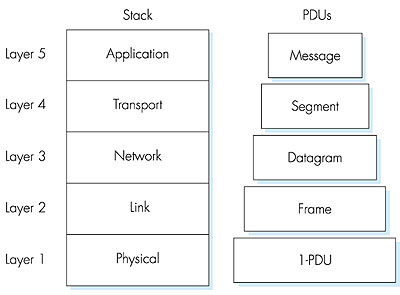
Abstracting away complexity is a basic rule in computer science: when we write some code, we can take for granted its compilation to machine code and execution on a particular CPU architecture. In the same way, when writing an HTTP web server, we take for granted that the transport of documents between client and server is handled from lower network stack layers. As shown on Figure 1, HTTP/2 relies on TCP as its transport layer.
TCP (RFC 9293) is a Layer-4 connection-based transport protocol: before sharing data, TCP client and server peers must establish a connection through a process called the three way handshake (RFC 9293), after which data is guaranteed to flow ordered and with no errors.
IP and LAN
Down in the stack, TCP Segments are packed in Layer 3 IP (IPv4) packets, allowing data transmission between so-called routers; common culture refers to the global mesh of networks interconnected by routers as the Internet.
But that's not all. To actually deliver the HTTP file to the destination machine you are reading this article, the last-hop router needs to pack the IP Packet in a Layer 2 Frame eventually routed to the network interface of the device: router-to-router and router-to-device communications occur via Layer 2 Ethernet Frames (either the 802.3 or 802.11 standard, depending on whether you are using Wi-Fi or not).
A first calculation
The maximum Ethernet frame size transmitted between hops (switches) is 1518 bytes (1500 bytes of payload, known as MTU + 18 bytes of Ethernet header), limiting the TCP Maximum Segment Size (MSS) to 1460 bytes.
MSS = MTU − header IP − header TCP = 1500 − 20 − 20 = 1460 byteTCP Congestion control
TCP achieves a reliable and ordered transmission relying on acknowledgments and the slow-start process: after opening the connection, client and server gradually increase the number of segments (cwnd) exchanged per Round Trip.
Given a window of 1 MSS, if we want to limit the download of an HTML page to 1 Round Trip Time (RTT), we need to limit the file size to 1460 bytes (this size includes the HTTP headers, usually compressed by HPACK, and TLS headers in case of HTTPS).
Bandwidth-related transmission time
Let's do some napkin math to calculate the transmission time for a singular MSS segment. We start by calculating the time T0 to load the document data from the server into the network; this depends on the link bandwidth. Assuming both the local and wide-area have a speed of 1Gbps and the Ethernet frame of 1518 B, we have:
T0 = (1518 * 8) b / 10^9 b/s = 12.14 µsThe frame is written onto link at each hop: the very first serialization occurs at the server NIC on the Layer 2 network of the datacenter hosting the server VM. Then, on every smart-switching step, the frame is buffered and retransmitted. Let's simplify the evaluation, considering as hops only the L3 routers identified by traceroute.
My
tracerouteoutput:1 myfastgate.lan (192.168.1.254) 3.410 ms 3.431 ms 3.717 ms 2 * * 10.1.3.152 (10.1.3.152) 4.395 ms 3 10.103.249.2 (10.103.249.2) 4.708 ms 4.680 ms 10.103.249.10 (10.103.249.10) 4.651 ms 4 10.1.14.141 (10.1.14.141) 4.478 ms 10.1.14.133 (10.1.14.133) 4.831 ms 10.1.14.141 (10.1.14.141) 4.803 ms 5 172.19.32.253 (172.19.32.253) 5.343 ms 172.19.33.1 (172.19.33.1) 5.539 ms 172.19.32.253 (172.19.32.253) 5.776 ms 6 172.19.32.101 (172.19.32.101) 6.219 ms 9.754 ms 172.19.32.117 (172.19.32.117) 8.664 ms 7 10.254.12.25 (10.254.12.25) 11.539 ms 10.254.12.29 (10.254.12.29) 11.307 ms 11.688 ms 8 93-63-100-105.ip27.fastwebnet.it (93.63.100.105) 11.973 ms 93-63-100-109.ip27.fastwebnet.it (93.63.100.109) 12.310 ms 12.111 ms 9 93-57-68-145.ip163.fastwebnet.it (93.57.68.145) 24.267 ms 21.112 ms 24.209 ms 10 cloudflare.rom.namex.it (193.201.28.33) 20.636 ms 23.576 ms 23.549 ms 11 172.68.196.21 (172.68.196.21) 21.412 ms 29.614 ms 29.417 ms 12 104.21.77.224 (104.21.77.224) 21.175 ms * 17.567 msSo we can calculate the total bandwidth-related time T01:
T01 = T0 * 12 = 0.14 msReading carefully the
tracerouteoutput and comparing it to T01, we can see that each RTT from my PC to the destination server is in the order of tens of milliseconds; roughly two orders of magnitude bigger than the 0.14 ms we calculated for T01! Let's find out why by considering other variables, and let's see if we can end up treating T01 as negligligible in the total time.Fiber optic medium transmission time
The second measure to consider is the time needed to propagate a bit (or the entire segment) from the server to the client. Let's say we are using a fiber optic network as transfer medium, where each bit of data travels at a speed of up to about 200 000 km/s (https://physics.stackexchange.com/questions/80043/how-fast-does-light-travel-through-a-fibre-optic-cable). Considering the exposing.guidongui.com website proxied by a CloudFlare PoP in Milan and my PC, currently in Turin, we have a distance of approximately 200 km. I'm estimating the distance along which the fiber cable is actually laid on the ground between the two cities, not the straight-line distance between them!
The propagation time is T1:
T1 = 200 km / 200 000 km/s = 1msAn order of magnitude larger than T01!
Let's verify this by pinging exposing.guidongui.com.
$ ping exposing.guidongui.com PING exposing.guidongui.com (2606:4700:3035::6815:4de0) 56 data bytes 64 bytes from 2606:4700:3035::6815:4de0: icmp_seq=1 ttl=58 time=7.00 msWait, we were expecting a 2 ms RTT, but we get 7ms. That's because the Wi-Fi link alone to my home router adds about 5 ms, so 7ms is completely fair, including all the routing overhead.
$ ping 192.168.1.254 PING 192.168.1.254 (192.168.1.254) 56(84) bytes of data. 64 bytes from 192.168.1.254: icmp_seq=1 ttl=64 time=4.95 msWe can conclude, for now, that the time to receive a single MSS segment is roughly half the RTT (considering only the server->PC trip), i.e.
T11=4msServer response evaluation time
Lastly, let's estimate the time T2 required by the server to produce the response after receiving the HTTP GET request.
Based on the traces, it is around 0.5ms.
T2 = 0.5ms. Beware that T2 takes into account only the time to render the response content, excluding the time to write the HTTP response buffer, already calculated in T01.Here is a cross-check on the web server running locally, using the command
hey -n 1000 -c 1 http://localhost:8080/posts/0:Summary: Total: 0.6534 secs Slowest: 0.0196 secs Fastest: 0.0004 secs Average: 0.0007 secs Requests/sec: 1530.4935 Response time histogram: 0.000 [1] | 0.002 [996] |■■■■■■■■■■■■■■■■■■■■■■■■■■■■■■■■■■■■■■■■ 0.004 [0] | 0.006 [0] | 0.008 [2] | 0.010 [0] | 0.012 [0] | 0.014 [0] | 0.016 [0] | 0.018 [0] | 0.020 [1] | Latency distribution: 10% in 0.0004 secs 25% in 0.0005 secs 50% in 0.0006 secs 75% in 0.0006 secs 90% in 0.0009 secs 95% in 0.0011 secs 99% in 0.0017 secs Details (average, fastest, slowest): DNS+dialup: 0.0000 secs, 0.0004 secs, 0.0196 secs DNS-lookup: 0.0000 secs, 0.0000 secs, 0.0038 secs req write: 0.0000 secs, 0.0000 secs, 0.0005 secs resp wait: 0.0005 secs, 0.0003 secs, 0.0113 secs resp read: 0.0001 secs, 0.0000 secs, 0.0006 secs Status code distribution: [200] 1000 responsesA theoretical conclusion
Based on the calculations, we can conclude that the transmission time for 1 MSS roughly matches half the RTT of an ICMP PING to the server, that is:
T_ipv6 = 4msin ipv6T_ipv4 = 12msin ipv4
Try it yourself :)
What's the time needed to download the page you are reading? In theory
You are reading a page of 5581 bytes. Let's consider the TCP congestion control mechanism discussed earlier; 5581 bytes plus the HTTP header requires 4 TCP segments.
The slow start congestion initially grows exponentially as follows:
RTT 1: 1        MSS
RTT 2: 2        MSS
RTT 3: 4        MSS
RTT N: 2^(N-1)  MSS
So 4 segments is 3 RTT:
t = 0     client sends the request;       + 4ms
t = 1     server sends *segment 1*;       + 4ms
t = 2     client receives and sends ACK;  + 4ms         -> RTT 1
t = 3     server sends segments 2,3;      + 4ms
t = 4     client receives and sends ACK;  + 4ms         -> RTT 2
t = 5     server sends segment 4;         + 4ms
t = 6     client receives and sends DONE;               -> RTT 3
For a total of 24ms!
Practical feedback with a real test
Let's verify the previous evaluation with a curl request countercheck:
curl -sS -o /dev/null   -w "ip: %{remote_ip}\n
ip_family:    %{http_version} %{remote_ip}\n\
dns:          %{time_namelookup}\n
tcp_connect:  %{time_connect}\n
tls_done:     %{time_appconnect}\n
tranfer_start:%{time_starttransfer}\n
total:        %{time_total}\n
size_header:  %{size_header} \n
size_body:    %{size_download} \n
http_version:         %{http_version}\n"   https://exposing.guidongui.com/posts/1

ip: 2606:4700:3035::6815:4de0
ip_family: 2 2606:4700:3035::6815:4de0
dns:        0.001963s
tcp_connect: 0.010077s
tls_done:   0.029329s
tranfer_start:       0.048186s
total:      0.051172s
size_header: 543 B
size_body:   5582 B
http_version:       2
We can clearly see two interesting results. We get a positive feedback regarding the 1 RTT estimate:
tcp_connect - dnsis 8.1ms, matching the theoretical 8 ms RTT.- The total time required to transmit the HTML content is barely 3ms. We can not see the slow start! Why? Looking for reasons online and asking Claude, I discovered that linux starts the cwnd at 10 segments: https://datatracker.ietf.org/doc/html/rfc6928.
Moreover, when using the browser, the result is different again! Using HTTP/3 + QUIC as the application protocol, the TCP secure connection overhead is further reduced.
Conclusions
Revisiting the good old TCP protocol and lower TCP/IP stack layers, we had the opportunity to appreciate the significant impact of the medium propagation speed on the download time of small documents.
Let's reconcile the theoretical components with the measured one-way time T11 = 4 ms:
| Component | One-way time |
|---|---|
| Serialization across 12 hops (T01) | ~0.14 ms |
| Server processing (T2) | ~0.5 ms |
| Fiber propagation, ~200 km (T1) | ~1 ms |
| Wi-Fi link to home router | ~2.5 ms |
| Total | ~4.14 ms |
The sum closely matches the measured T11, validating the analysis.
The conclusion of the article is different from what I was expecting: I was assuming that in order to transfer an HTML page as fast as possible, 1 MSS was the size to go. Instead, the outcome is quite different: with a modern connection, starting from 10 Mbps, transferring 10 MSS is not a problem at all, getting a response in less than 100 ms, a delay the human eye perceives as instantaneous.
My conclusion is a request for help: is there anything wrong in the analysis? Did I miss some important points that may further change the conclusions? If you think so, let's discuss it on reddit: https://www.reddit.com/r/Network/comments/1sp00f3/about_http_tcp_and_web_speed